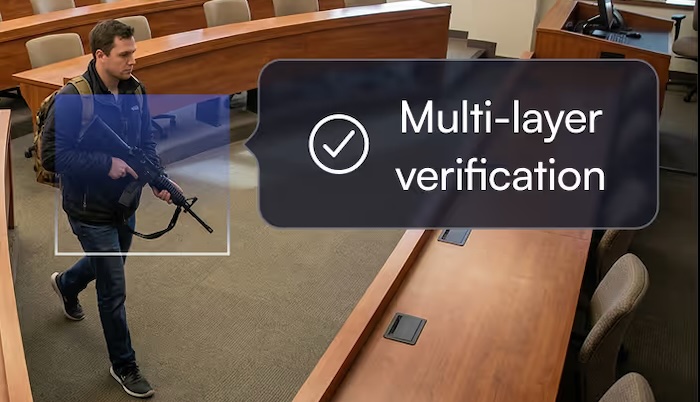
This guide covers what enterprise and public-sector organizations need to know when evaluating AI security cameras, including core detection capabilities, integration requirements, deployment models, and key features that reduce manual monitoring while improving incident response across multiple locations.
Understanding AI security cameras for enterprise needs
AI security cameras use artificial intelligence to analyze video footage in real time, automatically detecting people, vehicles, and specific behaviors rather than simply recording everything that moves. Unlike traditional systems that rely on basic motion detection and generate constant false alarms from shadows, animals, or weather changes, AI-powered cameras distinguish between routine activity and genuine security concerns.
This fundamental difference transforms video security from a passive recording tool into an active monitoring system that alerts your team only when something actually matters. For enterprise organizations—which account for 57.28% of video surveillance spending—managing dozens or hundreds of cameras across multiple buildings or locations, this intelligent automation dramatically reduces the burden on security personnel.
The core capabilities that define enterprise-grade AI cameras include:
- Intelligent object detection: Identifies and classifies people, vehicles, packages, and other objects with high accuracy rather than triggering on any movement
- Behavioral analysis: Recognizes suspicious patterns like loitering, wrong-way movement, or unauthorized access attempts
- Real-time alerting: Sends immediate notifications to any device when specific events occur
- Rapid video search: Locates specific incidents across millions of hours of footage in seconds rather than hours
Key features to evaluate in an enterprise AI camera system
Selecting the right AI camera system requires evaluating several critical capabilities that directly impact security effectiveness and operational efficiency. You should prioritize features that reduce manual monitoring burden, integrate smoothly with existing infrastructure, and scale easily as your organization grows.
Detection accuracy and intelligent alerts
Detection accuracy determines whether your security team receives actionable alerts or drowns in false notifications. High-quality AI systems can distinguish between a person approaching a restricted area and a plastic bag blowing across the parking lot. This precision dramatically reduces alert fatigue, which happens when security personnel become desensitized to constant notifications and start ignoring them entirely.
Customizable detection zones allow you to define specific areas where certain activities should trigger alerts. For example, you might configure the system to alert on any person entering a loading dock after hours while ignoring normal foot traffic during business hours.
Key detection capabilities to look for:
- Person and vehicle detection: Accurately identifies humans and vehicles while ignoring animals and environmental movement
- Loitering detection: Alerts when someone remains in a defined area longer than a specified time threshold
- Directional detection: Triggers when movement occurs in a prohibited direction, such as entering through an exit
- Object left behind: Identifies packages or items that appear and remain stationary in sensitive areas
Integration and compatibility
Enterprise environments rarely start from scratch. Most organizations have existing video management systems, access control platforms, and security operations tools that any new camera system must work alongside. Evaluating integration capabilities upfront prevents costly surprises during deployment.
Camera-agnostic platforms that work with standard IP cameras protect your existing hardware investment while adding AI capabilities. API availability enables custom integrations with enterprise systems like incident management tools and building automation systems. Native integrations with popular access control and VMS platforms simplify deployment and reduce ongoing maintenance complexity.
You should verify these common integration points:
- Video management system compatibility: Works with your existing VMS or provides a complete replacement
- Access control integration: Correlates video with door access events for comprehensive incident investigation
- Cloud and on-premises flexibility: Supports your preferred deployment model without forcing infrastructure changes
Scalability and deployment flexibility
Enterprise security needs evolve constantly as organizations grow, open new locations, or reconfigure existing spaces. The camera system you select today must accommodate tomorrow's requirements without requiring a complete replacement.
Cloud-based platforms, which overtook on-prem deployment in 2024, typically offer the most straightforward scalability, allowing you to add cameras at new locations without deploying additional server infrastructure. Hybrid approaches combine cloud management with local processing, providing flexibility for bandwidth-constrained environments or locations with unreliable internet connectivity.
User interface and ease of use
Even the most sophisticated AI capabilities provide limited value if security teams struggle to use the system effectively. Intuitive dashboards, mobile access, and streamlined workflows determine how quickly your team can respond to incidents and how efficiently they can conduct investigations.
Modern platforms provide web-based interfaces accessible from any device without specialized software installation. Mobile applications enable security personnel to receive alerts and view live feeds from anywhere. Search functionality that allows natural-language queries like "show me all people near the east entrance yesterday afternoon" dramatically accelerates investigations compared to manually scrubbing through hours of footage.
Types of AI security cameras for enterprise environments
Different camera form factors serve different purposes within enterprise security deployments. Understanding the strengths and limitations of each type helps you select the right cameras for specific locations throughout your facilities.
Dome cameras work well for indoor areas and retail spaces because of their discreet appearance and vandal-resistant design. Bullet cameras serve as visible deterrents for outdoor perimeters and parking lots, offering long-range viewing and weather resistance. Turret cameras provide versatile indoor and outdoor use with flexible positioning and good low-light performance. PTZ cameras, which can pan, tilt, and zoom, excel in large open areas where you need to track moving subjects actively.
Indoor vs. outdoor considerations
Environmental factors significantly impact camera selection and placement decisions. Outdoor cameras must withstand temperature extremes, precipitation, dust, and potential vandalism while maintaining image quality in varying lighting conditions. Indoor cameras face different challenges, including aesthetic requirements, ceiling height limitations, and the need to capture clear images in mixed lighting environments.
Weatherproofing ratings indicate a camera's ability to function in harsh conditions. IP66 or IP67 ratings provide protection against dust and water exposure suitable for most outdoor applications. Cameras deployed in extreme environments may require additional housing or heating elements to maintain reliable operation year-round.
Enterprise-specific security considerations
Enterprise deployments involve compliance requirements, data privacy obligations, and security standards that consumer or small business systems rarely address. Understanding these requirements before selecting a platform prevents costly compliance failures.
Data encryption protects video footage both during transmission and while stored. End-to-end encryption ensures that even if network traffic is intercepted, the video content remains unreadable to unauthorized parties. Role-based access controls limit who can view footage, export clips, or modify system settings based on job responsibilities.
Key security considerations include:
- Data encryption: Protects footage in transit and at rest using industry-standard encryption protocols
- Access controls: Granular permissions ensure users can only access footage and features appropriate to their role
- Audit logging: Comprehensive logs track who accessed what footage and when for accountability
- Data residency: Storage location options that comply with regional data sovereignty requirements
Implementation and deployment best practices
Successful enterprise deployments require careful planning that extends beyond simply installing cameras. Site assessment, network preparation, and team training all contribute to achieving the security outcomes your organization expects.
Network and infrastructure requirements
AI cameras generate significant network traffic, particularly when streaming high-resolution video to cloud platforms or centralized management systems. Assessing your current network capacity and planning for additional bandwidth requirements prevents performance issues that degrade video quality or delay alert delivery.
Bandwidth calculations should account for the number of cameras, resolution settings, frame rates, and whether video streams continuously or only during detected events. Many organizations find that hybrid deployments, which process video locally and transmit only alerts and clips to the cloud, significantly reduce bandwidth requirements while maintaining full functionality.
Training and change management
Technology adoption requires more than installation. Security teams must understand how to use new AI features effectively, interpret alerts appropriately, and leverage search and analytics capabilities during investigations. Investing in proper training accelerates time-to-value and ensures your organization realizes the full benefits of its investment.
Phased rollouts allow teams to become comfortable with new capabilities before expanding deployment. Starting with a pilot location provides opportunities to refine configurations, develop standard operating procedures, and identify training gaps before scaling across the entire organization.
Selecting the right vendor and solution for your enterprise
Vendor selection extends beyond feature comparisons to encompass support quality, company stability, and long-term partnership potential. The vendor you choose becomes a critical partner in your security infrastructure.
Support and customer success
Enterprise deployments require responsive support when issues arise. Evaluating support availability, response time commitments, and escalation procedures helps ensure you receive assistance when you need it most. Customer success resources, including onboarding assistance and training programs, contribute to long-term deployment success.
Future-proofing your investment
Technology evolves rapidly—the AI video surveillance market is projected to reach $33.8 billion by 2033—and the platform you select should accommodate future capabilities without requiring complete replacement. Software-based AI that improves through updates protects your investment better than hardware-dependent solutions that become obsolete. Open architectures that support integration with emerging technologies provide flexibility as your security needs evolve.
Getting started with Lumana's AI security camera solution
Lumana's enterprise cloud video security platform transforms standard IP cameras into intelligent agents that detect threats in real time and accelerate incident response. The platform combines camera-agnostic hardware support, advanced AI detection, and intuitive video management software to automate monitoring and simplify investigations across any number of locations.
Organizations using Lumana benefit from AI that goes beyond basic object recognition to identify suspicious behaviors with near-human perception. The platform surfaces highly specific alerts to any device, enabling security teams to respond immediately to genuine threats while ignoring routine activity. Powerful search and analytics tools allow teams to review millions of hours of video in seconds.
Key advantages of Lumana's approach:
- Camera-agnostic deployment: Works with existing IP cameras, protecting your current hardware investment
- Intelligent detection: Identifies specific behaviors and objects rather than triggering on all motion
- Simplified management: Centralized dashboard for managing cameras across unlimited locations
- Rapid investigation: Search across all footage instantly using natural descriptions
Ready to transform your enterprise security? Request a product demo to see how Lumana can modernize your video security infrastructure.
Frequently asked questions
How long does it take to deploy an AI security camera system across multiple enterprise locations?
Deployment timeline varies based on site complexity and network infrastructure, but most enterprises see initial cameras operational within weeks. Full system optimization, including alert tuning and team training, typically completes within one to three months.
Can AI security cameras integrate with existing video management systems?
Most modern AI camera platforms offer API integrations and compatibility with popular video management systems. You should confirm specific compatibility with your current VMS during vendor evaluation and ask about native integrations versus custom development requirements.
What is the difference between cloud-based and on-premises AI camera systems?
Cloud-based systems offer easier scalability and remote access but require reliable internet connectivity for full functionality. On-premises solutions provide greater data control and work effectively in bandwidth-constrained environments, while hybrid approaches combine benefits of both models.
How accurate are AI detection capabilities in real-world enterprise environments?
AI detection accuracy depends significantly on camera placement, lighting conditions, and proper system configuration during deployment. Working with experienced deployment teams and allowing time for alert tuning ensures optimal performance in your specific environment.
Do AI security cameras require significant IT resources to manage ongoing operations?
Modern AI camera systems are designed for operational efficiency with minimal ongoing IT involvement. However, enterprises should allocate resources for initial setup, periodic system updates, and occasional configuration adjustments as security needs evolve.